Rich text editing has become a standard requirement in modern web applications, from blog platforms and CMS dashboards to internal tools and customer portals. Giving users the ability to format content visually, without writing HTML by hand, is table stakes for any serious product.
But adding a WYSIWYG editor to a Vue application is rarely as simple as dropping in a component. The moment you need editor content to live in a shared state, flow through a form, persist across route changes, or sync with an API, things get complicated fast. Reactivity conflicts, unexpected re-renders, and data sync issues are the bugs that show up after integration, quietly, at scale.
This guide walks through the key challenges of integrating a vue wysiwyg editor with Vue’s state management layer and provides practical strategies for avoiding the most common pitfalls. We’ll reference Froala’s Vue Rich Text Editor as a concrete integration target where useful; it offers native Vue support, two-way binding, and lifecycle hooks that map cleanly onto the patterns described here.
Key Takeaways
- Vue’s reactivity system and rich text editors manage state independently; explicit synchronisation prevents conflicts.
- Choosing between Vuex and Pinia depends on your app’s architecture, not personal preference alone.
- Debouncing updates and avoiding deeply reactive HTML objects are the two highest-impact performance wins.
- Two-way binding via v-model is the cleanest integration path; manual watchers introduce subtle bugs.
- Security, validation, and auto-save should be planned at integration time, not bolted on afterwards.
Why State Management Becomes Challenging with Rich Text Editors
At first glance, a WYSIWYG editor looks like any other form input. It has a value, it fires events, and you bind it to your data. In practice, the relationship is more complex, and understanding why is the foundation for getting integration right.
Understanding Vue Reactivity
Vue tracks state changes through a dependency graph. When a reactive value changes, Vue re-evaluates any template expressions or computed properties that depend on it, then patches the DOM.
This works elegantly for primitive values and simple objects. Rich text content is neither. A single paragraph of formatted HTML can be several kilobytes of deeply nested markup. Treating it as a fully reactive object means Vue watches every character, every attribute, every nested node for changes, creating unnecessary overhead that compounds with document length.
The challenge isn’t that Vue can’t handle large strings. It’s how you store and observe editor content that determines whether that overhead stays acceptable or grows into a performance problem.
How WYSIWYG Editors Manage Content
A WYSIWYG editor maintains its own internal state. It tracks the cursor position, active formatting marks, selection ranges, undo history, and the current HTML output. This internal state is separate from your application state; the two need to be deliberately synchronised.
Most editors expose this synchronisation through events: input, change, content-changed, or similar. When a user types, the editor fires an event; your application listens, reads the new content, and updates its own state. The reverse path, updating editor content from application state, typically requires calling a method like setContent() or updating a bound prop.
This event-driven model is reliable when handled carefully. Problems arise when applications create feedback loops: an event updates the store, the store update flows back to the editor as a prop change, the editor fires another change event, and the cycle repeats.
Common Integration Problems
Three issues come up repeatedly in Vue WYSIWYG integrations:
- Infinite update loops occur when a state update triggers a prop change that triggers another state update. The fix is a single source of truth with careful event management, covered in depth in the two-way binding section.
- Lost editor content typically happens during component teardown: navigation clears the component before a pending save completes, or the editor is destroyed before its content is read.
- Excessive re-rendering usually traces back to storing HTML in a reactive ref that Vue observes too deeply, or to missing debounce on change handlers.
Choosing the Right Vue WYSIWYG Editor
The editor you choose shapes how much friction you’ll encounter during integration. Not all rich text editors are built with Vue’s reactivity model in mind.
Vue Compatibility Requirements
Look for an editor that ships as a proper Vue component, not a wrapper around a jQuery plugin or a framework-agnostic library bolted onto Vue with a thin adapter. Native Vue components expose props, emit events, and participate in the component lifecycle the way Vue expects.
Version compatibility matters too. Vue 2 and Vue 3 have different reactivity internals. An editor built for Vue 2 may behave inconsistently in a Vue 3 application even if it “technically works.” Confirm that the editor you choose explicitly supports your Vue version.
Editor Features That Support State Management
Beyond basic compatibility, prioritise editors that offer:
- v-model support, two-way binding without manual wiring.
- Debounce change events or at least fine-grained control over when events fire.
- Lifecycle hooks, initialised, destroy, focus, and blur events let you manage editor state cleanly.
- An imperative API, getContent() and setContent() methods for cases where reactive binding isn’t sufficient.
Froala’s Vue component, for instance, exposes a v-model interface alongside a full event API and an instance reference for imperative control, useful when you need to read content at form submission time rather than on every keystroke.
Long-Term Scalability Considerations
An editor that’s straightforward to integrate at the start can become a bottleneck as applications grow. Evaluate plugin and extension architecture early. If your requirements will eventually include custom toolbar buttons, content sanitisation pipelines, or collaborative editing, verify the editor supports those paths before committing.
Also consider the maintenance picture: active release schedules, clear upgrade paths, and good documentation are as important as features when you’re owning an integration long-term.
Planning Your State Management Strategy
Before writing integration code, it’s worth stepping back to decide where editor content should live. This choice has downstream effects on every other aspect of the integration.
Local Component State vs Global State
Not every use case requires global state. A single-page form that collects content and submits it, without that content needing to be accessible anywhere else, can reasonably keep editor content in a local ref. This is simpler and avoids global store overhead.
Global state makes sense when:
- Editor content is read by other components (e.g., a live preview panel).
- Content persists across route changes.
- Multiple editors contribute to a shared document model.
- Undo/redo history needs to survive component remounts.
When in doubt, start local. Promoting to global state later is straightforward; untangling unnecessary global state is not.
Working with Vuex
In a Vuex setup, editor content typically lives in a module state property and is updated through mutations:
// store/editor.js
const state = { content: ” }
const mutations = {
SET_CONTENT(state, html) {
state.content = html
}
}
const actions = {
updateContent({ commit }, html) {
commit(‘SET_CONTENT’, html)
}
}
In your component, dispatch the action from the editor’s change event handler, not directly from a watcher on the content prop. Watchers that observe computed store properties and write back to the store are the most common source of infinite loops in Vuex-based integrations.
Keep mutations granular and predictable. A single SET_CONTENT mutation is easier to debug and test than mutations scattered across the editor’s lifecycle.
Working with Pinia
Pinia simplifies this significantly. A content store is a few lines:
// stores/editor.js
import { defineStore } from ‘pinia’
export const useEditorStore = defineStore(‘editor’, {
state: () => ({ content: ” }),
actions: {
setContent(html) {
this.content = html
}
}
})
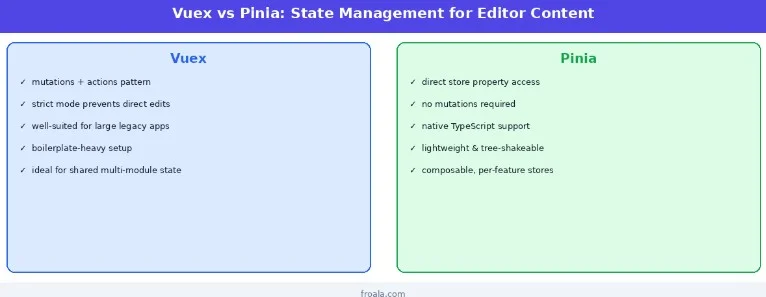
Pinia’s direct state access and lack of required mutations reduce boilerplate and make the synchronisation path more readable. For new projects, Pinia is generally the better choice. For projects already on Vuex, the patterns are equivalent; pick the one that fits your codebase.
Implementing Two-Way Data Binding Correctly
Getting binding right is the most important step in a stable integration. Done well, it’s nearly invisible. Done poorly, it’s the source of most of the bugs described above.
Understanding V-Model Integration
Most Vue-native editors support v-model:
<template>
<froala-editor v-model=”content” />
</template>
<script setup>
import { ref } from ‘vue’
const content = ref(‘<p>Initial content</p>’)
</script>
v-model on a component is syntactic sugar for :modelValue=”content” plus @update:modelValue=”content = $event”. The editor receives content as a prop and emits updates; Vue handles the binding automatically.
This is the recommended approach. It’s explicit about the data flow and avoids the common pitfall of duplicating update logic in multiple places.
Preventing Circular Updates
The circular update problem looks like this: user types → editor emits change → store updates → computed prop changes → editor receives new prop → editor emits change (again).
The fix is comparing values before writing. Most editors only emit change events when the user actually modifies content, but if you’re updating the editor programmatically (e.g., loading content from an API), gate that update:
function handleContentChange(newHtml) {
if (newHtml !== store.content) {
store.setContent(newHtml)
}
}
A single source of truth, either the store drives the editor, or the editor drives the store, but not both simultaneously, eliminates the loop entirely.
Handling Initial Content Loading
When content is fetched asynchronously (from an API, a CMS, a database), the editor may initialise before the content arrives. Handle this with a watch that fires once:
const { content } = storeToRefs(editorStore)
const editorRef = ref(null)
watch(content, (newVal) => {
if (editorRef.value && newVal) {
editorRef.value.editor.html.set(newVal)
}
}, { once: true })
Alternatively, use v-if to defer rendering the editor until data is available, keeping initialisation synchronous.
Optimising Performance with Rich Text Content
Performance issues with rich text editors rarely show up on day one. They emerge as documents grow longer, users are more active, and your reactive graph becomes more complex. The optimisations here are preventative as much as reactive.
Reducing Unnecessary State Updates
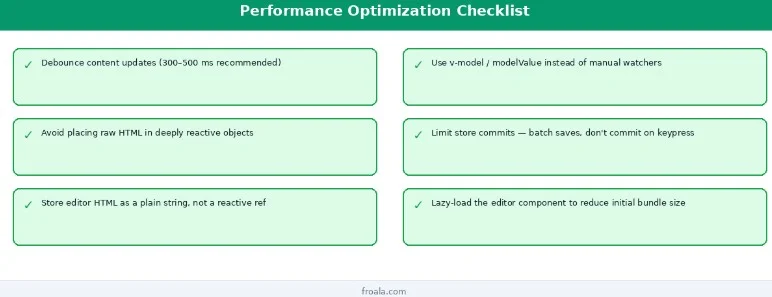
The single most effective optimisation: debounce your change handler. A user typing at normal speed fires 5–10 keystrokes per second. Without debouncing, that’s 5–10 store commits per second, each triggering reactive updates across any component observing that state.
import { debounce } from ‘lodash-es ‘;
const handleChange = debounce((html) => {
store.setContent(html)
}, 350)
350ms is a reasonable default, long enough to batch most keystrokes, short enough that the UI feels responsive.
Managing Large Documents
Long-form content (multi-thousand-word documents, rich media articles) can strain the reactive system if the HTML is observed at a fine-grained level. Prefer storing editor content as a plain string and avoiding reactive() or ref() wrappers that Vue traverses deeply:
// Prefer this
const content = ref(”) // Vue tracks the string reference, not its contents
// Avoid this
const content = reactive({ html: ” }) // Vue traverses object deeply
For very large documents, consider whether the editor needs to be reactive at all during editing. You can read content imperatively to save time rather than observing every change.
Avoiding Reactive Overhead
Every computed property and watcher that depends on editor content adds to the work Vue does on each update. Audit your reactive graph periodically. If you have multiple watchers observing the same content string and doing different transformations, consolidate them into a single computed property.
Avoid inadvertently creating reactive dependencies in places you don’t need them, for example, logging editor content in a watchEffect for debugging, then forgetting to remove it.
Handling Forms and Validation
Most real-world editor integrations live inside forms. Getting validation right requires treating editor content the same way you’d treat any other form field, with the same rigor around required state, length limits, and sanitisation.
Integrating Editor Content into Vue Forms
Whether you’re using VeeValidate, FormKit, or a custom validation layer, editor content should be included in your form model explicitly:
const form = reactive({
title: ”,
body: ”, // ← editor content lives here
tags: []
})
On submit, read the current editor content from the store or via an imperative getContent() call, assign it to form.body, then validate the full form object before sending.
Validation Best Practices
Three validations cover most use cases:
- Required check: strip HTML tags and check if the resulting text has content (avoid validating raw HTML for emptiness; <p><br></p> is technically non-empty but meaningfully blank).
- Length check: validate stripped text length, not HTML length, which varies significantly with formatting markup.
- Sanitisation: run content through a server-side sanitiser before persisting; client-side sanitisation is a first line of defence, not a substitute.
function isEditorEmpty(html) {
const stripped = html.replace(/<[^>]*>/g, ”).trim()
return stripped.length === 0
}
Error Handling Strategies
When validation fails, preserve the editor content. Don’t reset the form on failed submission; the user’s work should survive an invalid submission. Display field-level errors adjacent to the editor, not just in a summary banner, so the user knows exactly which field needs attention.
Managing Content Persistence
Getting content into the editor and reading it back out is only half the challenge. Persisting it reliably, especially across network latency, browser refreshes, and unexpected navigation, is what users actually feel.
Saving Content to APIs
Structure your save payload explicitly. Send the HTML content alongside any relevant metadata:
async function save() {
const payload = {
content: store.content,
updatedAt: new Date().toISOString(),
authorId: currentUser.id
}
await api.post(‘/documents’, payload)
}
Handle failures visibly. If a save fails, tell the user and preserve local state. A silent failure that loses content is worse than a visible error the user can act on.
Auto-Save Implementations
Auto-save is one of the highest-value UX features in a rich text application. The implementation is straightforward with a debounced save action:
const autoSave = debounce(async () => {
await saveToApi(store.content)
lastSaved.value = new Date()
}, 3000)
watch(() => store.content, autoSave)
Surface the save status to users, “Saving…” and “Saved 2 minutes ago”, so they have confidence their work is preserved.
Draft and Recovery Features
For critical content workflows, combine auto-save with a local draft stored in localStorage or sessionStorage. This provides a recovery path if the network save fails or the browser crashes:
watch(() => store.content, (html) => {
localStorage.setItem(‘editor-draft’, html)
})
// On mount, check for a draft
onMounted(() => {
const draft = localStorage.getItem(‘editor-draft’)
if (draft && !store.content) {
// Prompt user to restore
}
})
Working with Dynamic Components and Routing
Single-page applications introduce lifecycle complexity that server-rendered apps avoid. Editors that span route changes, coexist in tabs, or appear in multiple contexts need deliberate lifecycle management.
Editor Lifecycle Management
Initialise the editor in onMounted and tear it down in onUnmounted. If the editor exposes a destroy() method, call it; this releases event listeners and prevents memory leaks:
onUnmounted(() => {
editorInstance.value?.destroy()
})
Save content before teardown. If your component might be destroyed by navigation, capture content in a beforeRouteLeave guard or a beforeUnmount hook.
Handling Route Changes
Vue Router’s beforeRouteLeave guard is the right place to handle unsaved content:
onBeforeRouteLeave(async (to, from, next) => {
if (store.isDirty) {
const confirmed = await showUnsavedChangesDialog()
confirmed ? next() : next(false)
} else {
next()
}
})
This prevents accidental content loss without blocking navigation when content is already saved.
Supporting Multiple Editor Instances
When multiple editors coexist (e.g., a header field and a body field, or a multi-section page builder), keep their state in separate store properties or separate Pinia stores. Sharing a single content key between multiple editors is a common source of state conflicts.
Security and Content Integrity
User-generated rich text is a vector for XSS attacks. Content that looks safe in the editor can carry malicious scripts that execute when rendered elsewhere. Security needs to be designed in, not added as an afterthought.
Sanitising Rich Text Content
Never trust HTML that came from the client. Even with a well-behaved editor on the frontend, sanitise all rich text server-side before persisting or rendering it. Libraries like DOMPurify work on the frontend for a first pass; a server-side equivalent should run before anything reaches a database.
Define an allowlist of tags and attributes your application actually uses, and strip everything else. A blog post doesn’t need <script>, <iframe>, or onmouseover attributes.
Managing User Permissions
Not all users need full editor capabilities. A comment author and a content editor have different legitimate access to formatting features. Use the editor’s toolbar configuration API to restrict available tools by role, and expose only the formatting options each role actually needs.
Maintaining Consistent Content Output
Rich text content tends to accumulate inconsistencies over time: redundant styles, vendor-specific markup, encoding differences across browsers. Normalise content on save, strip empty paragraphs, standardise heading levels, and ensure HTML structure matches your rendering expectations. Content that renders consistently is easier to maintain and less likely to break when your frontend changes.
Testing and Debugging Your Integration
Integration bugs are harder to catch than unit bugs because they span the boundary between the editor’s internal state and your application state. A deliberate testing strategy catches them before users do.
Verifying State Synchronisation
Write integration tests that simulate the full data flow: user types content → store updates → content is readable from store. Then test the reverse: store content changes programmatically → editor reflects the new content.
Pay particular attention to the initial load case (content arrives asynchronously) and the teardown case (component is destroyed while a save is in flight).
Performance Testing
Measure update frequency in development. Vue DevTools’ performance panel shows component re-render counts. If an editor component is re-rendering dozens of times per second during typing, something in your reactive graph is wrong.
Test with realistically large documents, not the 20-word example content from your local dev environment. Performance issues at scale don’t surface until documents are at scale.
Building a Reliable QA Process
Cover these scenarios in your QA checklist:
- Load existing content into the editor from an API.
- Type, save, navigate away, return, content should be intact.
- Submit a form with empty editor content; validation should catch it.
- Submit a form with an XSS payload in the editor; sanitisation should neutralise it.
- Navigate away with unsaved changes; the guard should prompt the user.
Automate what you can with Cypress or Playwright. WYSIWYG editors are testable with browser-level automation, and the investment pays off quickly in a content-heavy application.
Conclusion
Integrating a vue wysiwyg editor with Vue’s state management layer requires more intentionality than most component integrations, but the patterns are learnable and consistent once you understand them.
The core principles: choose a Vue-native editor that works with Vue’s reactivity model rather than against it, establish a single source of truth for content early, debounce updates, and plan for persistence and security before the first line of integration code is written.
Froala’s Vue component is designed with these integration patterns in mind, offering v-model support, lifecycle hooks, and an imperative API that maps cleanly onto both Vuex and Pinia workflows. Whether you’re building a publishing tool, an internal CMS, or a lightweight comment editor, the architecture decisions you make at integration time determine how much friction you’ll carry forward as the application grows.
Invest in the integration layer now. It’s significantly cheaper than untangling it later.
Frequently Asked Questions
What is a vue wysiwyg editor?
A vue wysiwyg editor is a rich text editing component built specifically for Vue applications. It lets users format content, headings, bold text, lists, links, and images visually, without writing HTML manually. The resulting output is structured HTML that can be stored, rendered, and transformed programmatically by the application.
Should I store editor content in Vuex or Pinia?
It depends on your application’s architecture. If you’re on Vue 3 and starting fresh, Pinia is simpler and better suited to modern Vue patterns. If your application already uses Vuex heavily, staying consistent reduces cognitive overhead. The synchronisation patterns are equivalent between the two, the choice is mostly about what fits your existing codebase.
How can I prevent infinite update loops with a vue wysiwyg editor?
Establish a single source of truth and make data flow unidirectional. The editor should update the store on change, and the store should only push content back to the editor on initial load or external updates (e.g., collaborative changes from another user). Avoid watchers that observe store content and then call editor methods unconditionally; always compare values before writing.
How do I improve performance when editing large documents?
Debounce change handlers (300–500ms is a good starting point) to reduce store commit frequency. Store editor content as a plain ref(”) rather than a nested reactive object. Avoid computed properties that transform large HTML strings on every render. And consider reading content imperatively to save time instead of observing every change reactively.
What security considerations are important for rich text editors?
Three things matter most: sanitise content server-side before persistence (never trust client-submitted HTML), define an allowlist of permitted tags and attributes rather than a blocklist of dangerous ones, and restrict toolbar features by user role so users can only access formatting capabilities they legitimately need. Client-side sanitisation with a library like DOMPurify is a useful first layer but is never a substitute for server-side validation.
All the photos in the article are provided by the company(s) mentioned in the article and are used with permission.
Disclaimer: This article contains sponsored marketing content. It is intended for promotional purposes and should not be considered as an endorsement or recommendation by our website. Readers are encouraged to conduct their own research and exercise their own judgment before making any decisions based on the information provided in this article.