
Every time you jump between apps, you lose more than just a few seconds. You lose focus, you lose momentum, and you often lose track of important details. This constant shuffling — from email to spreadsheets, from chat tools to meeting apps — is known as context switching. For small teams, it feels annoying. For growing organizations, it becomes a silent productivity killer.
The average employee toggles between dozens of apps each day, burning energy on logistics rather than results. That is why so many businesses look for the best project management tools to centralize work and reduce distractions. But tools alone are not enough. What teams really need is a platform built to minimize context switching by design.
That is where Lark comes in. Far beyond a chat or meeting app, Lark bundles communication, collaboration, and workflow management into one ecosystem. Let’s explore five of its features that directly address the costs of context switching and show how your team can reclaim focus.
Lark Messenger keeps communication tied to action
Most chat platforms do a great job of letting people talk — but a poor job of turning those conversations into results. That gap is where context switching thrives. You discuss a project in chat, then jump to a task tracker, then over to your calendar.
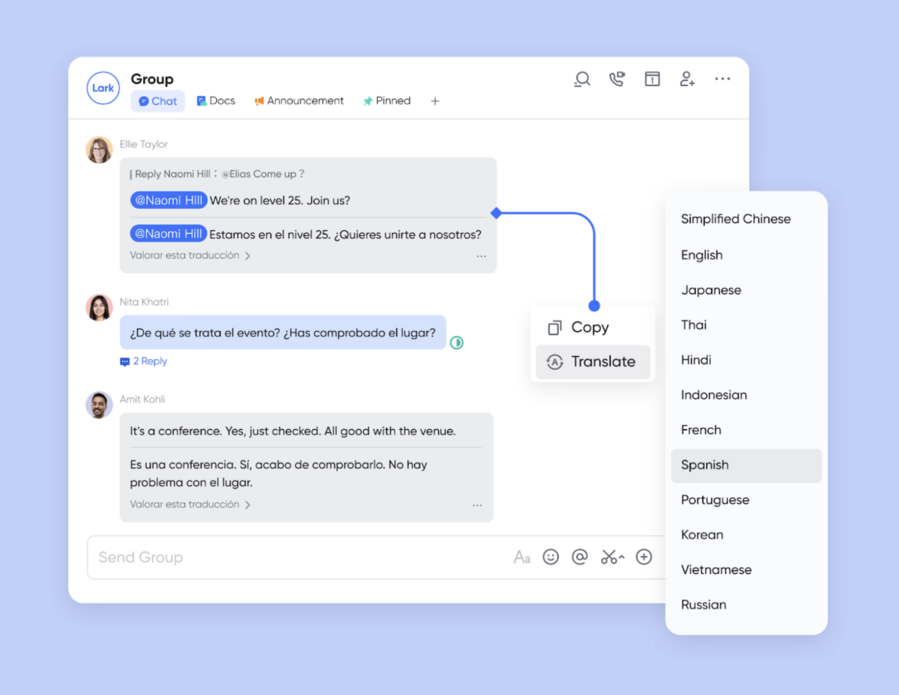
Lark Messenger reduces those jumps by keeping everything connected. Messages can be pinned for later, searched instantly, or converted into tasks and calendar events without ever leaving the conversation. If a colleague drops a link to a Doc, it opens inside Lark, not in a separate app.
For growing teams, this small shift has an outsized impact. Communication no longer lives in a silo. Instead, it becomes the first step in execution, cutting down on mental overhead and endless app juggling.
Lark Base centralizes projects and data
A common source of context switching is data fragmentation. Marketing teams keep one spreadsheet, operations manage another, and project managers scramble to reconcile them. Switching back and forth not only wastes time but also creates errors.
Lark Base solves this by turning scattered spreadsheets into a structured, connected workspace. You can toggle between table view, Kanban boards, and calendars, depending on how your team prefers to see information. Everyone is looking at the same dataset, so there’s no need to cross-check.
Even better, with automated workflow in Lark, repetitive updates are handled automatically. Tasks can be assigned when a status changes, notifications can trigger when deadlines are near, and approvals can move forward without manual intervention. Instead of bouncing between apps to push things along, Base keeps the process flowing in one place.
Lark Approval removes decision delays
Approvals are deceptively simple but notoriously disruptive. Waiting for a manager’s green light often means halting progress and checking emails repeatedly. That mental drag adds to the cost of context switching.
Lark Approval streamlines this by creating a clear flow for any type of request. Employees can submit forms in seconds, managers receive instant notifications, and the decision is logged automatically. No one has to dig through emails or wonder about the status.
By eliminating uncertainty, Approval reduces the need to keep checking different channels. Teams stay focused on moving forward, confident that decisions will come through the same consistent process every time.
Lark Docs & Lark Wiki keep knowledge in one place
Switching between apps is not just about tasks — but also about information. How often do you find yourself looking for “that one file” across cloud drives, inboxes, or personal folders? Each search is a switch that drains focus.
Lark solves this with a two-part system: Docs for active collaboration and Wiki for permanent knowledge. Docs allow real-time co-editing, comments, and links to other parts of Lark like Calendar or Messenger. Once documents reach a finalized state, teams can move them into Wiki, where they stay searchable and neatly organized.
The result is fewer dead ends and fewer distractions. Team members know exactly where to draft, where to store, and where to find information. By cutting down the hunting and switching, they get back hours of productive time each week.
Lark Calendar reduces scheduling friction
Meetings are often unavoidable, but how they are scheduled can sometimes lead to an endless amount of context switching. Teams jump between calendar apps, email threads, and chat messages to lock down a time, especially across multiple time zones. On top of that, video calls often require separate third-party links, adding yet another layer of disruption.
Having all of that live within one space diminishes the juggling of scheduling. Instead of framing meetings as a separate workflow, Lark treats meeting scheduling as part of the same ecosystem. Video calls can launch directly from the same interface, so teams don’t need to switch tools or rely on third-party links. Meeting scheduling no longer takes extra time or attention.
Conclusion
The hidden cost of context switching isn’t just wasted minutes; it is wasted energy, watered-down focus, and degraded execution. Every time your team hops between apps, they bear the cost of having to reorganize themselves. This only exacerbates organizations that are navigating growth.
Lark solves this problem by bringing communication, projects, documents, and decisions together in one platform. Messenger ensures conversations lead to action. Base provides a structured home for projects and data. Approval clears bottlenecks in decision-making. Docs and Wiki keep knowledge organized, while Calendar cuts down scheduling chaos.
Together, these features give teams more than convenience. They restore focus, the most valuable currency in modern work. Instead of bleeding time across a dozen apps, your team can concentrate on meaningful progress.
In the end, Lark proves that the solution is not more tools but smarter ones. By combining collaboration and process management in a single space, it functions as the business process management software that helps organizations grow without being dragged down by context switching.
Disclaimer: This article contains sponsored marketing content. It is intended for promotional purposes and should not be considered as an endorsement or recommendation by our website. Readers are encouraged to conduct their own research and exercise their own judgment before making any decisions based on the information provided in this article.