
Picking a file upload website service sounds straightforward until you’re three months into production and dealing with failed uploads on mobile, a security incident from an unvalidated file type, and an engineering sprint just to add multi-cloud storage support.
The decision made early in a project has a long reach. The upload infrastructure you choose affects how quickly your team can ship features, how reliably your users can get files into your product, and how much of your engineering budget gets consumed by maintenance rather than differentiation.
This checklist is designed to help product teams, developers, and technical decision-makers evaluate file upload services against the criteria that actually matter in production, not just the ones that look good in a feature comparison table. At Filestack, we’ve seen what happens when teams choose the wrong solution for their stage and use case, and we’ve tried to make this guide genuinely useful regardless of which direction you go.
Key Takeaways
- Upload reliability directly affects retention: failed uploads increase abandonment, and without resumable transfers, even a brief connectivity drop can cost you a user.
- DIY upload infrastructure carries compounding costs: maintenance, security patching, and scaling overhead add up well beyond initial development time.
- Security is not optional at any scale: malicious file uploads, broken access controls, and unvalidated file types are all real attack vectors that require deliberate mitigation.
- Media processing is a separate engineering problem: image optimisation, video transcoding, and format conversion are distinct from file upload and must be evaluated independently.
- Total cost of ownership beats sticker price: the right evaluation combines engineering time, infrastructure overhead, and long-term scalability, not just the monthly subscription cost.
Why File Upload Infrastructure Matters More Than Teams Expect
It’s easy to underestimate the upload layer. In early development, a basic file input works. The complexity arrives later, and it tends to arrive all at once.
Upload Reliability Impacts User Experience
Failed uploads are quite failures. Users who hit a timeout during a large file upload, or lose progress mid-transfer on a spotty mobile connection, rarely complain; they leave, or they avoid the feature entirely. This matters especially in workflows where file upload is a core action: onboarding document submission, creative asset delivery, and collaborative file sharing.
The specific reliability features that prevent this, resumable uploads, chunked file transfer, and automatic retry logic, are not glamorous, but they are the difference between an upload experience users trust and one they dread. Mobile users in particular are exposed to unstable networks by default. Without network-resilient upload handling, you’re building for a best-case network condition that many of your users will never have.
Beyond reliability, upload speed shapes overall product perception. Even if a file transfer succeeds, slow uploads make a product feel slow, and that association sticks.
DIY Upload Systems Become Expensive Over Time
The DIY path tends to look attractive early: a presigned S3 URL, a small Lambda function, and a basic frontend input get you to a working demo quickly. What it doesn’t show you is the bill that comes due later.
Ongoing maintenance costs are real: storage provider APIs change, security vulnerabilities emerge, and retry logic that works at low volume breaks under concurrency. Infrastructure scaling challenges compound: what handles your current load may not handle 10× that load without rearchitecting. Storage management overhead grows with your user base. Monitoring and debugging upload failures requires tooling and attention that most product teams would rather spend on features.
None of this is insurmountable, but it is consistently underestimated, particularly by teams building their first production upload system.
Security Risks Increase With Growth
File upload is one of the most common attack surfaces in web applications. Malicious file uploads, executables, scripts, or oversized payloads disguised as valid file types require explicit mitigation. As your user base grows, so does the variety of inputs your system needs to handle safely.
Access control complexity also increases over time: who can upload what, where files are delivered, and under what conditions links expire all become meaningful governance questions. Secure file delivery: signed URLs, token-based access, time-limited download links, is table stakes for any application handling sensitive content. And the data handling responsibilities that come with user-generated files grow more complex the moment compliance requirements enter the picture.
With those foundations in mind, here’s what to actually look for when evaluating a file upload service.
Core Features Every File Upload Website Should Include
Not all file uploaders are built to the same standard. These are the non-negotiable capabilities that separate production-ready infrastructure from a basic implementation.
Resumable and Chunked Uploads
Modern upload infrastructure must handle unstable networks and large files; those two requirements are inseparable from any honest definition of “reliable.” Chunked uploads divide files into smaller pieces that are tracked and transferred independently. If the connection drops, the transfer resumes from the last successful chunk rather than restarting from zero.
This matters most for mobile users, international users on variable-quality connections, and any application where files regularly exceed a few megabytes. Without resumable upload support, your upload success rate is a function of connection quality, which is outside your control.
Multi-Cloud and Storage Integrations
Modern file upload infrastructure should not lock your files into a single storage provider. Look for Amazon S3 compatibility, Google Cloud Storage integration, Azure Blob Storage support, and the ability to import files from external cloud sources (Dropbox, Google Drive, and similar). The ability to route files to the storage layer that fits your architecture, without rewriting your upload implementation, is a meaningful operational advantage.
File Validation and Security Controls
File type restrictions need to operate at the MIME type level, not just the file extension level; extensions are trivially spoofed. Upload authentication ensures that only authorised users can initiate transfers to your infrastructure. Signed upload policies allow you to define constraints (file size, type, destination) that are enforced server-side before a byte is written to storage. Malware scanning capabilities, whether native or integrated, are increasingly expected for any application accepting user-generated files.
Global Performance Optimisation
For applications with users across multiple regions, CDN-backed delivery is not optional; it’s the difference between acceptable upload speeds and genuinely fast ones. Regional upload optimisation routes each transfer to the nearest infrastructure endpoint. Edge acceleration reduces the round-trip overhead that adds latency for international users. Faster asset retrieval after upload is equally important: the time between a user uploading a file and being able to share or use it is part of the overall upload experience.
Buyer’s Checklist for Evaluating File Upload Services
Use this checklist as a structured framework when comparing solutions, whether you’re evaluating managed platforms, open-source libraries, or the long-term viability of a DIY stack.
Developer Experience
The quality of a file upload service’s developer experience determines how quickly your team can integrate it, how easily they can debug it, and how much of their attention it demands over time. Evaluate SDK quality across your target frameworks: React, Vue, Angular, and vanilla JS, alongside the clarity and completeness of API documentation. Framework compatibility should be confirmed, not assumed.
Flexibility for UI customisation matters if your design system has specific requirements. And time-to-implementation is a meaningful signal: a service that takes two weeks to integrate properly has a higher real cost than one that takes two days, regardless of what the pricing page says.
Scalability and Infrastructure
Ask how the service handles concurrent uploads under peak load, not just average load. Confirm large file support with explicit size limits and chunked transfer implementation details. Understand the infrastructure redundancy model: what happens when a region goes down? Evaluate global delivery performance with actual latency data, not marketing copy. These are the questions that separate services designed for production from services designed to look good in demos.
Security and Governance
Encryption requirements cover both transit (TLS) and storage (at-rest encryption, key management). Authentication methods should align with your existing identity infrastructure. Access permissions need to be granular enough to support your use case, not just binary allow/deny. Audit logging capabilities matter more than most teams expect until the moment they need them, typically during a compliance review or a security incident.
Media Processing Features
If your application handles images or video, treat media processing as a separate evaluation dimension. Image optimisation (compression, resizing, format conversion) directly affects your users’ perceived performance. Video transcoding support determines whether you can deliver across different device types and connection speeds. Real-time transformation capabilities, applying crops, overlays, or watermarks at the CDN edge, can replace entire processing pipelines. Automatic compression reduces storage and bandwidth costs without requiring manual intervention.
Pricing Transparency
A pricing model is only useful if you can project it forward. Storage costs should scale linearly and predictably with your data volume. Bandwidth pricing, particularly egress costs, should be clearly defined and not buried in terms of service. Processing charges for transformations and transcoding should be itemised, not bundled in ways that make cost forecasting impossible. And the scalability pricing model should hold at 10× your current volume: if the unit economics break at scale, you’ll be re-evaluating vendors at the worst possible time.
With the evaluation criteria established, here are the traps that catch teams most often during this process.
Common Mistakes Businesses Make When Choosing a File Upload Service
Here are some common mistakes businesses usually make when choosing a file upload service:
Focusing Only on Initial Pricing
The subscription cost of a managed file upload service is visible on a pricing page. The cost of the engineering time to build and maintain a comparable DIY system, the CDN bill, the storage provider fees, the monitoring tooling, and the incident response overhead are not. Total cost of ownership routinely surprises teams at scale; managed services that look expensive at first glance frequently look like a bargain after 18 months of operating a DIY alternative.
Ignoring Developer Workflow Efficiency
Implementation time and ongoing maintenance burden rarely appear in feature comparisons, but they represent real costs. A service that requires two weeks to integrate correctly and demands regular expert attention is a more expensive choice than one that integrates in hours and runs without intervention, even if the monthly fee is higher. Debug complexity, upgrade friction, and the cognitive load of understanding a proprietary system all contribute to a hidden DX tax that compounds over time.
Underestimating Upload Volume Growth
Production upload volumes can change rapidly: a product launch, a viral moment, or a new partnership can send traffic far beyond anything a staging environment predicted. An infrastructure that handles 1,000 uploads per day comfortably may fail in unexpected ways at 100,000. Evaluating a file upload service at your current scale is necessary but not sufficient; evaluating it at 10× that scale is the more useful test.
Choosing Solutions Without Built-In Reliability Features
Resumable uploads, retry handling, and upload recovery are not advanced features; they are the baseline for any upload infrastructure serving real users on real devices. Selecting a solution that requires custom engineering to achieve basic reliability is a choice to defer that engineering debt, not eliminate it. By the time the reliability gaps become visible in production, the cost of addressing them is significantly higher than building on a reliable foundation from the start.
Comparing DIY Upload Systems vs Managed Services
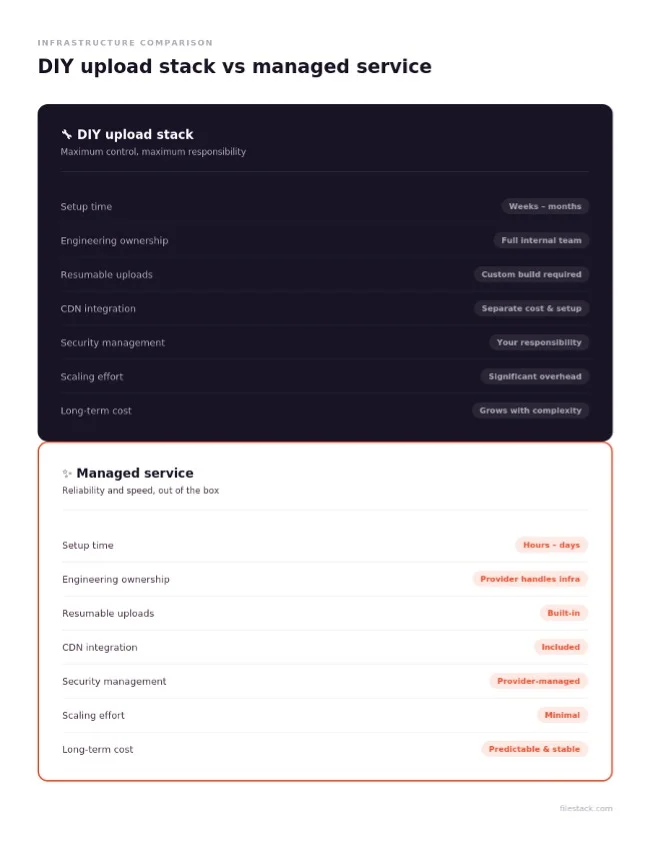
The DIY vs managed debate comes down to a clear tradeoff: control and flexibility on one side, speed and reduced operational overhead on the other. Here’s how that plays out across the dimensions that matter most.
Engineering Ownership
A DIY stack places full infrastructure responsibility on your team: storage provider integration, CDN configuration, retry logic, security patching, capacity planning, and incident response. Managed services shift most of that responsibility to the provider. For product teams whose core competency is not upload infrastructure, the question is whether owning that responsibility generates competitive value or just generates maintenance work.
Reliability and Performance
Managed services are built and maintained by teams whose entire focus is upload reliability. That focus translates to more consistent upload performance, better handling of edge cases, and faster responses to infrastructure issues. DIY stacks can achieve equivalent reliability, but it requires deliberate investment, and that investment competes with your product roadmap.
Security Management
The operational security requirements for a file upload system: MIME validation, malware scanning, access control, signed URL generation, encryption key management, are not trivial. Managed services bake these in. DIY stacks require implementing, testing, and maintaining them as the threat landscape changes. The risk exposure from an insecure upload endpoint is real; the question is who carries responsibility for managing it.
Long-Term Cost Efficiency
Infrastructure scaling costs and developer resource allocation both favour managed services over time. A DIY stack that is cheap at low volume becomes expensive as it scales, not just in infrastructure costs but in the engineering attention required to keep it running reliably. Managed services offer predictable pricing models that scale with your usage without requiring proportional increases in engineering investment.
What Modern Development Teams Prioritise in Upload Platforms
Beyond the checklist criteria, there are broader organisational factors that shape how teams think about upload infrastructure.
Faster Product Development
Engineering time spent on upload infrastructure is engineering time not spent on product differentiation. Modern development teams consistently prioritise platforms that reduce operational complexity, not because reliability doesn’t matter, but because reliability that someone else maintains is more efficient than reliability you build yourself. Reduced engineering overhead, faster feature deployment, and lower complexity across the stack all compound into a meaningful competitive advantage over time.
Better User Experience
Reliable uploads, faster file delivery, and mobile optimisation are user experience outcomes; they show up in retention metrics and support ticket volumes before they show up in engineering discussions. Teams that treat upload reliability as a product quality issue (rather than an infrastructure concern) tend to make better decisions about which infrastructure to use.
Flexible Architecture Support
Modern web applications are increasingly API-first, serverless, and headless. Upload infrastructure needs to fit into that architecture without forcing workarounds. REST APIs, webhook support, serverless-compatible SDKs, and headless integration patterns are not optional for teams building on modern stacks; they are requirements that should be confirmed before committing to a platform.
How Filestack Supports Modern File Upload Workflows
Filestack is designed around the premise that upload infrastructure should be something teams integrate once and rely on, not something they maintain continuously.
Unified Upload and Delivery Platform
Filestack combines file upload, processing, transformations, and delivery into a single workflow. Rather than stitching together a separate upload handler, a processing service, a CDN configuration, and a delivery layer, teams can manage the entire pipeline through one API. Files uploaded through Filestack can be resized, converted, watermarked, and delivered through a global CDN without additional infrastructure, which is particularly relevant for applications handling images and video.
Built for Developers
Filestack’s SDKs cover JavaScript, React, Vue, Angular, iOS, Android, and server-side environments. The API is REST-based and well-documented. Frontend integration is designed to be fast: the upload picker can be embedded with a few lines of code, and the UI components are customisable to match existing design systems. Cloud storage compatibility covers S3, Google Cloud, Azure, and external sources, including Dropbox and Google Drive.
Production-Ready Infrastructure
Large file handling via resumable, chunked uploads is built into the core product. CDN-backed delivery is standard, not an add-on. Upload reliability features: retry logic, upload recovery, and progress tracking are part of the default implementation. Global scalability is handled at the infrastructure level, which means teams don’t need to re-architect their upload layer as their user base grows.
That said, Filestack is not the right fit for every team. Very low-volume internal tools may not need managed infrastructure at all. Teams with specific compliance requirements or on-premises constraints may need a hybrid approach. The goal of this checklist is to help you make that determination clearly, whatever conclusion you reach.
Conclusion
File upload infrastructure is one of those product decisions that rarely feels urgent until it is, and by then, the cost of switching is much higher than the cost of choosing correctly the first time.
The checklist in this guide is designed to surface the questions that distinguish production-ready infrastructure from solutions that look adequate in demos. Developer experience, scalability, security, media processing, and pricing transparency are the five dimensions that determine how a file upload service performs over the long run, not just at launch.
Filestack is built to address all of them: a managed upload platform that reduces engineering overhead, handles reliability at scale, and gives development teams a single integration point for uploads, processing, and delivery. Whether you’re evaluating Filestack or building your comparison framework from scratch, the most important thing is to evaluate against your actual production requirements, not the simplified version of them.
The right upload infrastructure should disappear into the background. Your users should never think about it. That’s the standard worth holding any solution to.
Ready to choose a file upload service that can support real users, production traffic, and long-term scale? Filestack’s file uploader helps teams add secure uploads, resumable file handling, cloud storage integrations, transformations, and CDN-backed delivery without building the full upload pipeline from scratch.
Frequently Asked Questions
What is a file upload website service?
A file upload website service is a managed platform that handles the full pipeline of transferring files from a user’s browser or device to cloud storage, including the frontend UI components, upload reliability features (resumable uploads, retry logic), security controls, and file delivery infrastructure.
What features should a file upload platform include?
At minimum: resumable and chunked uploads, file type validation and MIME enforcement, signed upload policies, CDN-backed delivery, multi-cloud storage integrations, and SDK support for your development stack. For media-heavy applications, add image optimisation, video transcoding, and real-time transformation capabilities.
How do resumable uploads work?
Resumable uploads divide a file into fixed-size chunks that are transferred and tracked independently. The server records which chunks have been successfully received. If the connection drops mid-transfer, the client can resume from the last confirmed chunk rather than restarting from zero, which is essential for large files and unstable network conditions.
Why do businesses move away from DIY upload systems?
The most common triggers are: upload-related bugs consuming disproportionate engineering time, reliability incidents impacting users, scaling costs exceeding projections, or the realisation that adding new upload features (new storage integrations, transformations, multi-source uploads) requires more infrastructure work than the team can justify.
What security features matter most for file uploads?
MIME type validation at the server level, signed upload policies that enforce constraints before any file is written to storage, malware scanning integration, encrypted delivery via signed URLs, and access control over who can upload to and retrieve from your storage.
How do CDN-backed uploads improve performance?
CDN-backed upload infrastructure routes each transfer to the nearest point of presence, reducing the round-trip latency between the user’s device and the upload endpoint. The same CDN then serves the uploaded file for retrieval, so both the upload and the subsequent delivery benefit from geographic distribution.
What is the difference between storage and upload infrastructure?
Upload infrastructure handles the transfer mechanism: the SDK, the reliability features, the security controls, and the API surface. Storage is where files persist after upload: S3, Google Cloud Storage, Azure Blob, and so on. Many managed upload services handle both or integrate with your existing storage provider.
How much does it cost to maintain file upload infrastructure?
Highly variable, but consistently underestimated. Beyond cloud storage and bandwidth costs, teams typically spend engineering time on retry logic, security patching, monitoring, debugging, and adapting to storage provider API changes. A reasonable estimate for a mid-size DIY system is one to two engineer-weeks per quarter, which compounds significantly over 12–24 months.
Which industries benefit most from managed upload services?
Media production, healthcare (where document upload is core to onboarding), legal technology, e-commerce (product image upload), SaaS platforms with user-generated content, and any application where users regularly upload files larger than a few megabytes or from mobile devices on variable-quality connections.
How can developers evaluate file upload APIs?
Build a working integration against your most complex use case, not a hello-world demo. Test large file handling, failure recovery, concurrent uploads, and edge cases like interrupted connections. Review the documentation for completeness and accuracy. Evaluate the SDK against your actual framework, not a generic JavaScript example. And ask specifically about upgrade paths and breaking change policies before committing.
Disclaimer: This article contains sponsored marketing content. It is intended for promotional purposes and should not be considered as an endorsement or recommendation by our website. Readers are encouraged to conduct their own research and exercise their own judgment before making any decisions based on the information provided in this article.