
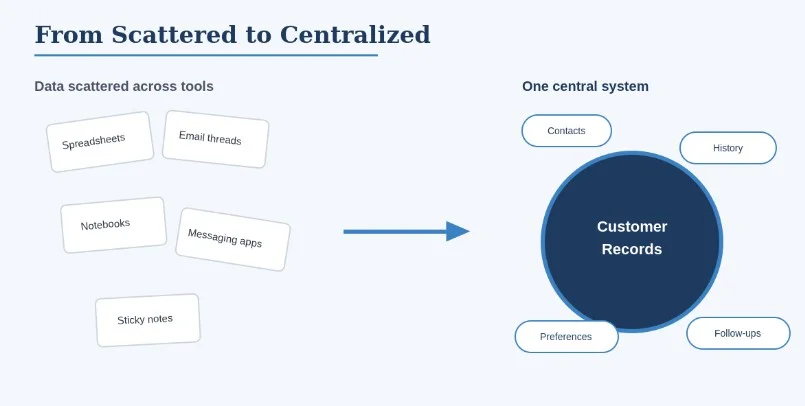
The ability to organize customer data is among the less obvious essential aspects of running a successful business. It isn’t a priority until there is an issue — and at that point, the issue is often spread across more than a dozen different areas all at once. As companies grow in size, customer details tend to be scattered across spreadsheets, email threads, notebooks, messaging applications, and a host of other software tools. If the data is difficult to locate or out of date, an easy customer interaction can quickly become a burden.
A well-organized approach to managing customer data helps a company save time, maintain accurate records, and provide better service. The aim isn’t to design something complicated. It’s about making useful information reliable, precise, and accessible to those who need it, whenever they need it.
Why Organized Customer Information Matters
Information about customers includes names, contact information, communication history, previous purchases, preference notes, insider knowledge, and follow-up times. When all of that information lives in a single system, employees can understand a customer’s history without having to search through several sources first.
An organized system also prevents duplicate records and stops crucial follow-ups from falling through the gaps. Particularly for small companies, where a single person typically juggles multiple responsibilities, an organized system can be the difference between a customer management approach that is easy to run and one that feels like an endless scramble.
Start With the Information You Actually Need
A frequent error is to collect excessive amounts of information without a clear justification for it. Adding more fields does not make a record more useful; it usually just makes the record harder to maintain. Before you set anything up, it’s important to decide which customer information is genuinely worth tracking.
Depending on the type of business you are in, this might include:
- Customer name and contact details
- Job title and company
- Past conversations
- Products or services purchased
- Important preferences
- Follow-up dates
- Project or sales status
- Internal notes
Keeping records focused makes them easier to maintain and far more useful to the people who rely on them day to day.
Keep Customer Data in One Central Location
When customer data is stored in multiple locations, employees waste time trying to work out which version is the most recent. A central system solves this by giving authorized team members a single, easy access point to view and edit customer information.
For smaller companies, a customer relationship management (CRM) system offers an easier alternative to juggling numerous spreadsheets. A good CRM is built on the idea of keeping all information about customers and their activities together, using a simple interface that even a small team can adopt in a short time — rather than an extensive platform that takes months to master.
The particular software matters less than the way it’s implemented. What is essential to make a central system work is a standard procedure for entering, updating, and retrieving data that the entire team follows.
Create Consistent Data Entry Rules
Organization can break down quickly when each employee records data in a different way. One worker writes out full company names while another uses abbreviations; one records phone numbers with dashes while another uses none. Over time, these minor variations make a database harder to search and less trustworthy.
Simple data entry guidelines prevent most of this. The business might agree to:
- Use the same format for telephone numbers
- Record company names consistently
- Avoid unnecessary abbreviations
- Use standardized categories
- Note down any important conversations
- Update contact information whenever it changes
Each of these practices is easy on its own. Together, they make a significant difference as the customer database grows.
Separate Important Information From General Notes
Not every piece of information carries the same importance. The most important customer details should be obvious at a glance, while less important observations can sit in a general notes section without cluttering the overview.
Creating distinct categories — such as contact information, sales opportunities, support issues, and scheduled follow-ups — helps employees find what they need without combing through a customer’s entire history. The system also feels more user-friendly, which matters more than how it looks.
Track Customer Interactions
A customer’s interaction history provides valuable context for future conversations. Instead of relying on memory, a company can track significant interactions such as meetings, calls, emails, requests, and completed tasks.
This is particularly important when more than one person interacts with a customer. Anyone stepping into the relationship can review what has already been discussed and pick up the conversation without asking the customer to repeat themselves. That is a small courtesy clients tend to notice.
Review and Update Records Regularly
Customer databases go stale quickly. Businesses and employees change roles, people move, phone numbers and addresses change, and customer needs shift. An account that was accurate just six months ago may now be out of date.
A regular review process helps keep information accurate. Depending on the size and nature of the company, records might be reviewed every month, every quarter, or whenever the situation calls for an update. Removing duplicate or outdated entries along the way keeps the database under control instead of letting it swell.
Protect Customer Information
Organization should always go hand in hand with responsible data handling. Customer data should be accessible only to the people who need it to do their jobs.
In practice, this means paying attention to appropriate access controls, secure passwords and software, frequent backups, and clear internal policies for handling customer data. It also means knowing and observing the privacy and security requirements that apply to the company. Good security and good organization aren’t two separate things — they complement one another.
Make the System Easy to Use
Even the most sophisticated customer management system can fail if people are uncomfortable using it. The most effective system is one that fits naturally into the way the team already works, rather than one that demands a change in behaviour every time someone needs to write a note.
Before committing to a new approach or platform, it’s worth considering how easily users can add data, search records, update information, and keep track of changes. This matters especially for smaller teams without dedicated database staff — a big part of why lightweight, focused CRMs have become popular with businesses that want an organized system without the cost.
Turn Organization Into a Routine
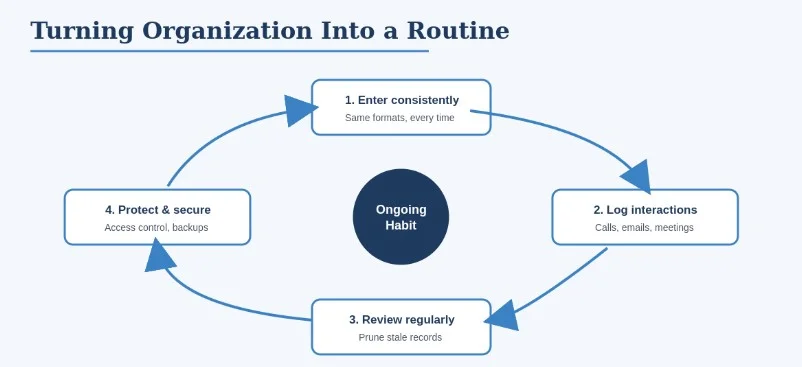
Organizing customer data isn’t a one-time task. It’s an ongoing process shaped by consistent routines.
A good routine might include updating records after major interactions, reviewing follow-ups at the start of each day, and periodically checking older records for accuracy. Over time, these simple habits reduce administrative work and make customer relationships easier to manage.
Final Thoughts
Organizing customer data gives a company a better understanding of its relationships, and a clearer view leads to better decisions and more consistent service. By centralizing key information and applying consistent practices for data entry, tracking interactions, and reviewing records regularly, a business can build a system that is both efficient and durable.
For smaller teams that want an organized structure without the expense or complexity of an enterprise platform, a straightforward tool such as Less Annoying Lacrm is a great place to start. Less Annoying CRM keeps leads, contacts, tasks, and calendar events together in one simple plan with an interface that teams can understand within a single day, plus quick support to help while making any changes needed. It isn’t the right solution for every company — teams that need deep marketing automation or advanced reporting will eventually outgrow it, but for solo consultants and small service teams, its ease of use is exactly what they need.
In the end, the aim isn’t to accumulate as much information as possible. The goal is to make the information that matters easy to access, accurate, secure, and available when needed — regardless of the system you choose to store it in.