Digital audiences expect realism. Whether in video games, animated films, virtual showrooms, or augmented reality apps, surfaces must look and feel authentic. Wood should show grain variation. Fabric should reveal weave patterns. Metal should reflect light naturally; when textures look artificial or flat, immersion breaks instantly.
A 3D scanner scan helps solve this challenge by capturing real-world geometry and surface color at the same time. Instead of manually recreating materials from scratch, creators can digitize physical objects and convert them into production-ready assets. As global demand for immersive content increases, understanding how texture capture works has become essential for designers, artists, and developers across industries.
The Growing Challenge of Realistic Textures
Creating believable textures has traditionally required hours of modeling, photography, and manual refinement. Even skilled artists struggle to replicate subtle imperfections such as scratches, dents, or fading caused by wear. These small details are what make digital assets feel real.
Common pain points include:
- Inconsistent realism across assets
- Time-intensive manual texturing workflows
- Difficulty capturing reflective or transparent materials
A properly executed 3D scanner scan addresses these issues by recording fine surface detail directly from physical objects. This reduces guesswork and improves consistency across large projects.
What Is a 3D Scanner Scan?
A 3D scanner scan is the process of digitally recording an object’s shape and surface appearance. The result is a 3D model composed of two essential components. First is geometry, typically represented as a point cloud or mesh. Second is texture data, which includes color information mapped onto the model’s surface.
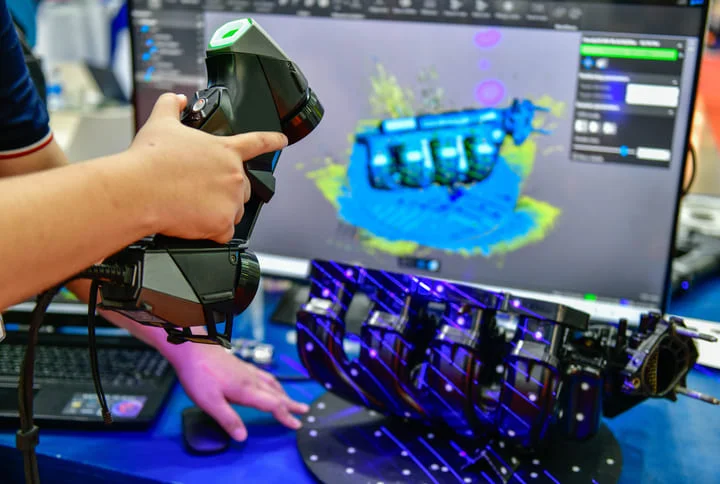
Many scanners rely on structured light technology. In this method, patterned light is projected onto an object, and cameras analyze how the pattern distorts across the surface. Structured light systems enable precise surface reconstruction by measuring these distortions. Integrated RGB cameras capture color information simultaneously, allowing geometry and texture to align accurately within a single workflow.
How Texture Capture Works in Practice
Geometry Mapping Through Structured Light
The scanning process begins with depth acquisition. Projected light patterns deform across curves, edges, and surface details. Cameras interpret these changes and convert them into spatial coordinates. Millions of data points form a digital representation of the object’s shape.
High-resolution systems capture fine details such as fabric fibers, carved engravings, or subtle dents. Accurate geometry is critical because texture maps rely on a stable surface structure for proper alignment.
Simultaneous Color Acquisition
At the same time, RGB cameras collect color information from multiple angles. The scanner records variations in tone, shading, and surface patterns while depth data is being generated. Software then maps this color data onto the mesh using UV coordinates, ensuring the texture wraps correctly around the 3D model.
Capturing geometry and color simultaneously improves accuracy and reduces misalignment between shape and surface detail. This integration is what makes a 3D scanner scan especially valuable for digital media production.
Why Texture Accuracy Matters in Digital Media
Texture realism directly influences how light behaves in digital environments. Modern rendering engines use physically based rendering, or PBR, to simulate real-world light interaction. According to industry documentation from major creative software providers, accurate base color data supports additional maps such as roughness, metallic, and normal maps.
When textures originate from real-world scans, artists gain a strong foundation for these advanced material workflows. This improves believability in:
- Video games and interactive media
- Film and visual effects
- Virtual and augmented reality
- E-commerce visualization
With global AR and VR markets projected to exceed 100 billion dollars in the coming years, realistic asset creation continues to grow in importance. Texture accuracy is no longer optional in immersive content production.
From Object to Production-Ready Asset
A structured workflow ensures consistent results. Preparation begins by managing lighting conditions. Diffused lighting reduces harsh shadows, while reflective surfaces may require temporary matte sprays to improve scan accuracy.
During the 3D scanner scan, operators move around the object or rotate it to capture overlapping angles. Overlap is essential because scanning software aligns frames using shared surface features. Once scanning is complete, post-processing begins. This stage typically includes:
- Cleaning stray geometry
- Merging multiple scan passes
- Optimizing polygon density
- Generating UV maps and exporting textures
The final output can be integrated into modeling and rendering pipelines using common 3D file formats. Efficient processing ensures that scanned textures transition smoothly into production environments.
Technical Factors That Influence Texture Quality
Several variables determine the final appearance of a scanned texture. Hardware, environment, and software each play a role.
| Factor | Why It Matters |
| RGB Camera Resolution | Higher resolution improves texture sharpness |
| Depth Accuracy | Impacts alignment between geometry and color |
| Light Wavelength | Influences surface detail capture |
| Frame Rate | Affects stability during handheld scanning |
Environmental conditions also matter. Strong ambient lighting can alter perceived color balance. Reflective materials may distort projected patterns. Transparent objects can scatter light and reduce depth accuracy. Careful calibration and controlled environments improve overall texture reliability.
Overcoming Common Texture Capture Challenges
Even advanced systems face limitations. Here are practical solutions:
Reflective Surfaces
- Use matte spray coatings
- Employ cross-polarized lighting
Dark or Absorptive Materials
- Increase light exposure
- Use scanners optimized for low-light sensitivity
Large Objects
- Divide into sections
- Use reference markers for alignment
Some structured-light systems are engineered to address these precision challenges more effectively. For example, the 3DMakerPro Moose series is known for high-resolution capabilities, making it suitable for capturing intricate details on small to medium-sized objects where fine lines and subtle textures matter. The Seal series emphasizes exceptional accuracy on smaller objects, offering fine resolution performance designed for detail-focused work where precision is critical.
The Expanding Role of 3D Scanning in Media Pipelines
As digital media production evolves, the line between physical and digital assets continues to blur. Virtual production stages now combine real-time rendering engines with scanned environments. Game studios rely on scanned props to build expansive worlds faster. Designers use scans to preserve real-world textures in digital archives.
A 3D scanner scan does more than capture shape. It captures context: surface wear, material aging, and subtle imperfections that manual modeling often overlooks.
When integrated thoughtfully, it supports:
- Faster asset development
- Greater realism
- Improved collaboration across global teams
Conclusion
Realistic digital experiences rely on precise texture capture. Using structured light projection, high-resolution color imaging, and accurate data alignment, a 3D scanner scan converts physical surfaces into detailed digital assets that preserve real-world depth and color information.
When geometry and texture are captured together, creators can reduce issues caused by reflective materials, uneven lighting, and time-consuming manual workflows. As immersive technologies continue to grow worldwide, mastering texture-focused scanning helps professionals produce assets that look authentic, interact naturally with light, and meet rising audience expectations.