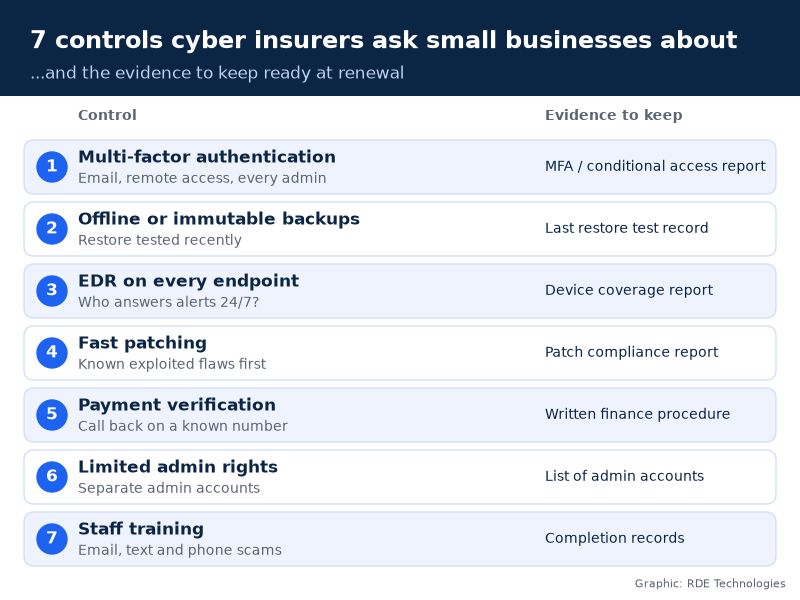
Attackers pick targets by weakness, not size. These seven controls are what underwriters check first, and what keeps a small business running after an attack.
No business is too small to be hacked. Most attacks are automated, so criminals don’t choose a 20-person accounting firm because it’s important. They choose it because a password was reused or a server went unpatched. Cyber insurers know this, which is why their applications now read like security audits. The seven controls below are the ones underwriters ask about most consistently, and they happen to be the same controls that decide whether a small company is back at work in two days or two months.
Why do attackers bother with small businesses?
Because they’re easier to get into, and automated attacks cost almost nothing to run. The FBI’s Internet Crime Complaint Center logged more than one million complaints in 2025, with reported losses of about $20.9 billion, up 26% from 2024 (FBI IC3 2025 Internet Crime Report). Business email compromise alone accounted for just over $3 billion of that.
Verizon’s 2026 Data Breach Investigations Report found that exploiting software vulnerabilities has overtaken stolen credentials as the most common way into an organisation, at 31% of breaches (Verizon 2026 DBIR). Scanning the internet for unpatched systems costs an attacker almost nothing, and it doesn’t care how many staff you have.
What will my cyber insurer actually ask about?
Wording differs between carriers, but these seven controls show up on almost every application and renewal form we’ve seen.
1. Is multi-factor authentication on email, remote access and admin accounts?
This is usually the first question, and often a deal-breaker. Microsoft researchers found that MFA cut the risk of account compromise by more than 99% across the accounts they studied (Microsoft Research). Underwriters want it everywhere a stolen password could be used from outside: Microsoft 365 or Google Workspace, VPN, remote desktop tools and every administrator login. An authenticator app beats text-message codes.
2. Are backups separated from the network, and have you tested a restore?
Ransomware groups go after backups first. Insurers want to know that at least one copy is offline or immutable, meaning it can’t be changed or deleted for a set period, and that someone has actually restored from it recently. A backup nobody has tested is a hope, not a control.
3. Do all endpoints run endpoint detection and response, and who watches the alerts?
Traditional antivirus matches known malware. Endpoint detection and response (EDR) watches behaviour, such as a process suddenly encrypting thousands of files, and can isolate a machine automatically. The follow-up question matters just as much: who responds at 2 a.m. on a Saturday? An alert nobody reads doesn’t stop anything.
4. How fast do you patch, especially internet-facing systems?
Given the Verizon findings, expect more scrutiny here. The same report found that only about a quarter of critical vulnerabilities on the U.S. government’s Known Exploited Vulnerabilities list were fully fixed, and the median time to fix rose to 43 days. A practical rule for a small business: patch anything on CISA’s Known Exploited Vulnerabilities catalog within days, not at the next monthly cycle, starting with firewalls, VPNs and anything else reachable from the internet.
5. How do you verify changes to payment details?
This is where business email compromise turns into a real loss. A supplier’s “new bank details” email arrives from an account that looks right, or actually is right because the supplier was compromised. Insurers increasingly ask whether you confirm any change to payment instructions by calling a known phone number, not the one in the email. It’s a process control, not a technology one, and it’s free.
6. Who has administrator rights?
If every employee is a local admin on their laptop, one clicked link can install whatever an attacker wants. Underwriters ask whether admin rights are limited, whether admins use separate accounts for admin work and whether those accounts have MFA. Fewer admin accounts means fewer keys to steal.
7. Do you train staff, including on phone and text scams?
Most applications ask about security awareness training and phishing simulations. Make sure yours covers more than email. Verizon found that phishing by text and voice call was 40% more successful than traditional email phishing. Short, frequent training beats an annual slideshow.
What evidence should I keep ready?
Underwriters can, and sometimes do, verify answers after a claim. Keep proof you can produce in an afternoon.
Control
What the insurer asks
Evidence to keep
MFA
Enforced on email, remote access, admins?
Conditional access or MFA report
Backups
Offline or immutable? Tested?
Backup config and last restore test
EDR
On every endpoint? Monitored 24/7?
Device coverage report, monitoring contract
Patching
How fast for critical issues?
Patch compliance report
Payments
Call-back verification?
Written finance procedure
Admin rights
Limited and separate?
List of admin accounts
Training
How often? Phishing tests?
Training completion records
What if you can’t tick every box?
Say so. An honest “partially” with a plan is far better than a “yes” you can’t support. If one legacy system can’t run MFA, describe how it’s isolated and when it will be replaced. If backups are offline but untested, schedule a restore test before the policy renews and note the date.
Underwriters price risk; they don’t expect perfection from a 15-person firm. What causes trouble after a claim is a gap between what the application said and what investigators find. Many brokers will also tell you which controls a carrier treats as mandatory, so you can prioritise those first and phase in the rest over the year.
Is this worth it if insurance is the only reason?
Insurance shouldn’t be the only reason, but it’s a useful forcing function. Every control on this list also makes an attack less likely or less damaging, and the insurer’s questions are a decent free checklist for a business that has never had a security review.
The challenge for most small firms is time. Owners don’t want to spend renewal season digging through admin consoles. If you’re evaluating outsourced support, such as managed IT services NYC businesses use for exactly this kind of reporting, ask the provider to show you a sample evidence pack before you sign. If they can’t produce one, they probably can’t produce it for your insurer either.
Being small doesn’t make you invisible. It just means you can fix these seven things faster than a large company can.
Nathan Spitalny is the CEO of RDE Technologies, a managed IT and cybersecurity provider founded in 2009 in Oceanside, New York. His team supports healthcare practices, senior-living facilities and small businesses across New York City and Long Island.
The European Business Review uses cookies to improve site functionality, provide you with a better browsing experience, and to enable our partners to advertise to you. Detailed information on the use of cookies on this Site, and how you can decline them, is provided in our Privacy Policy and Terms and Conditions. By clicking on the accept button and using this Site, you consent to our Privacy Policy and Terms and Conditions. ACCEPT Reject
Privacy & Cookies Policy
Privacy Overview
This website uses cookies to improve your experience while you navigate through the website. Out of these cookies, the cookies that are categorized as necessary are stored on your browser as they are essential for the working of basic functionalities of the website. We also use third-party cookies that help us analyze and understand how you use this website. These cookies will be stored in your browser only with your consent. You also have the option to opt-out of these cookies. But opting out of some of these cookies may have an effect on your browsing experience.
Necessary cookies are absolutely essential for the website to function properly. This category only includes cookies that ensures basic functionalities and security features of the website. These cookies do not store any personal information.
Any cookies that may not be particularly necessary for the website to function and is used specifically to collect user personal data via analytics, ads, other embedded contents are termed as non-necessary cookies. It is mandatory to procure user consent prior to running these cookies on your website.